What it checks
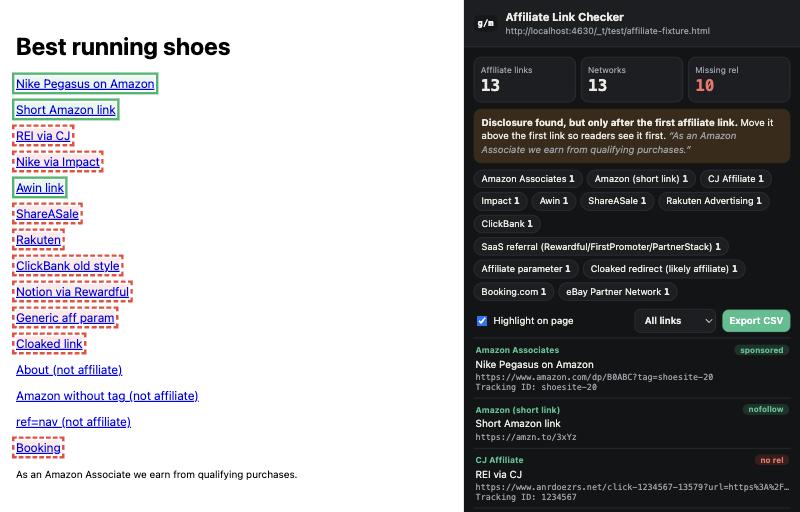
- Every affiliate link, by network. Amazon Associates, Impact, CJ, Awin, Rakuten, ShareASale, ClickBank, eBay Partner Network, Partnerize, Skimlinks, Sovrn, AvantLink, FlexOffers, Digistore24, Booking.com, SaaS referral programs (Rewardful, FirstPromoter, PartnerStack) and more - plus cloaked links like
/go/and/recommends/. - Tracking IDs. See the Amazon tag, Impact or CJ publisher ID, Awin affiliate ID and others on every link. Catch a missing or wrong tag before it costs you commissions.
- rel="sponsored". Google asks for paid and affiliate links to carry
rel="sponsored"(ornofollow). Links without it are counted and outlined in red on the page. - Disclosure. Finds wording like "As an Amazon Associate" or "we may earn a commission", and warns you if it only appears after the first affiliate link.
- Export to CSV for audits, client reports or competitor research.
Who it is for
- Affiliate publishers and bloggers: audit your own pages for broken tags, missing rel attributes and disclosure placement.
- Affiliate managers: check how partners link to you, and spot which networks and competitors a publisher already works with before you pitch them.
- SEO agencies: run a link-attribute compliance check on a client's money pages in seconds.
How to install (while the Web Store listing is in review)
- Download the zip above and unzip it.
- Open
chrome://extensionsand switch on Developer mode (top right). - Click Load unpacked and choose the unzipped folder.
- Pin the extension from the puzzle-piece menu, open any page and click the icon.
How to read the results
| You see | What it means | What to do |
|---|---|---|
| Red "no rel" tag | The link has neither rel="sponsored" nor rel="nofollow" | Add rel="sponsored" (most affiliate plugins have a setting for it) |
| "hidden" tag | The link exists in the page code but is not visible | Check it is intentional - hidden affiliate links can look like cookie stuffing |
| Disclosure "only after the first link" | Readers can click before they see the disclosure | Move a short disclosure above the first affiliate link |
| Cloaked redirect | A link on your own domain like /go/product that likely redirects to an affiliate URL | Make sure the redirect target carries your tracking ID |
| Amazon (short link) | An amzn.to link - the tag is inside the redirect | Open it once to confirm your tag is applied |
Privacy
The extension only reads a page when you click its icon, uses Chrome's activeTab permission (no access to your browsing otherwise), makes no network requests, stores nothing and contains no analytics. The source is a few small, readable files.
Want to know what those links are worth? Use the affiliate EPC calculator, or find inactive partners with the dormant affiliate finder.
Frequently asked questions
Is the Affiliate Link Checker free?
Yes. It is free, needs no account, and has no paid tier.
Do affiliate links need rel="sponsored"?
Google asks that links you are paid for, including affiliate links, are marked rel="sponsored" or rel="nofollow". Unmarked paid links can be treated as a link scheme.
Does it detect every affiliate link?
It detects links by network domain, URL pattern and common affiliate parameters, which covers most programs. Links that hide behind an unrelated redirect domain cannot be identified without following them, so treat the count as a minimum.
Does the extension send my data anywhere?
No. It runs only when you click it, reads the current page locally, makes no network requests and stores nothing.